
 3D for Android
 no
 English
 Deutsch
 French
 Russian
 Spanish
 Portugues
 Japanese
 Korean
 Turkey
 Italy
 Poland
 Indonesia
 Arabic
 India
 Thailand
 Malaysia
 Filipino
 China
 Taiwan
 Vietnam
 Netherlands
 Sweden
 Denmark
3D Player for Android
This app plays 3D movies and 3D photos on Android devices with good image quality. If your smartphone is fast enough, it look like a small IMAX 3D cinema. The player works with active shutter 3D glasses.

This app is a port of the S3D Player for Windows. It has almost all the features of the original Windows version, but some of them are not available due to Android limitations. For example, there is no direct access to YouTube's video directories. The application has been specifically optimized to exceptionally fast and high-quality video playback on Android. We hope, you enjoy its convenience and stability.
Parameters
| Graphics engine | OpenGL 3.2 |
| Video handler | FFmpeg 9.2.0 |
| Operation System | Android 13 |
| Compatible ARM | arm64-v8a |
| Display method | Switching Side |
| Display Frame Rate | 90 to 240 FPS |
| Preferred Frame Rate | 120 FPS |
| Picture Formats | SBS, T/B, L/R, Half |
| Video Formats | SBS, T/B, L/R, Half |
| Type of 3D glasses | Active shutter glasses |
| Synchro: Type 1 | Via a USB cable |
| Synchro: Type 2 | Phone Bluetooth |
| Compatibility | S3D Glasses |
| Glasses charge | Via phone USB |
Restrictions
For flicker-free show, your phone must support a refresh rate near 120 FPS. Phones with 90 FPS also work well, but the flickering is somewhat noticeable. To make it completely invisible, watch with the lights off. The player also works on 60 FPS phones, but It flickers a lot. But if there are no other options, you can watch it as is.How to connect
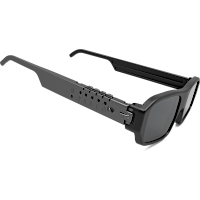
Update the glasses firmwareThe Android player requires a glasses firmware update. The firmware version must be v2.7 or later. See the glasses page for instructions.
Phone settings
Open the 'Glasses' menu and enable Bluetooth to connect the glasses. Bluetooth support is still under development, so synchronization over Bluetooth may not work properly on all phone models. For reliable 3D tests, connect the glasses directly with a USB cable. This requires USB OTG support on your phone. You can check it with the USB OTG Checker app.
Via USB cable
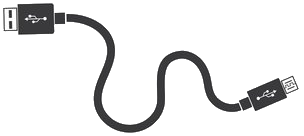
Connect the glasses with a USB cable and press the PWR button on the glasses to wake them up. If you do not want to use the glasses over USB, turn this option off in the 'Glasses' menu. Otherwise, the player will take over the glasses every time you connect them for charging. Note that synchronization quality and sync lock speed are much better over USB than over Bluetooth.
|
|
|
|
|

|
|
* This option is currently being improved
Set the screen FPS
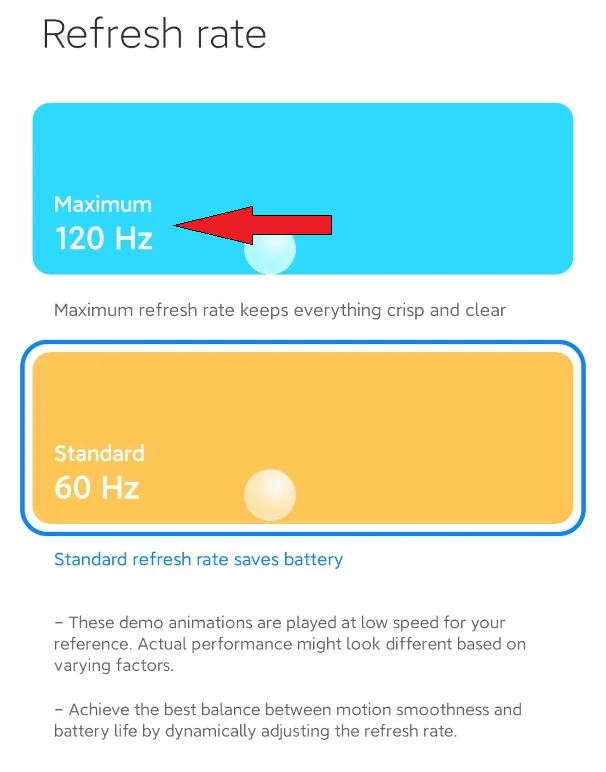
Next, set the display refresh rate to the highest available value. For example, the Xiaomi Redmi Note 11 supports refresh rates from 90 Hz to 120 Hz. Open the Android 'Display and brightness' settings, find the 'Refresh Rate' parameter and select 120 Hz.
Best mobile phone for 3D
The best image quality with nearly perfect color reproduction is achieved by models with an AMOLED or OLED panel. Such a display has a truly deep black color and very sharp pixels. There is one more serious advantage: displays of this technology do not use a scanning backlight, so you will see a clean, uniform image without moving backlight bands.Recommended models (AMOLED / OLED, 120 Hz, under $300):
| Model | Display | Refresh rate | Resolution | Price |
| Xiaomi Redmi Note 11 | 6.43" AMOLED | 90 Hz | 1080x2400 | $60..90 |
| Xiaomi Redmi Note 15 5G | 6.77" AMOLED | 120 Hz | 1080x2392 | $190..250 |
| Samsung Galaxy A26 5G | 6.7" Super AMOLED | 120 Hz | 1080x2340 | $250..300 |
| Nothing Phone 3a | 6.77" AMOLED | 120 Hz | 1080x2392 | $280..300 |
| Nothing Phone 3a Lite | 6.77" AMOLED | 120 Hz | 1080x2392 | $250 |
Important: most phones switch the refresh rate automatically and drop to 60 Hz to save battery. Before watching 3D, set the display mode in phone settings to a fixed 120 Hz (Samsung: "High" motion smoothness, Pixel: "Smooth Display", Xiaomi / Nothing: refresh rate "High").
Tablets and other Android devices
The player will most likely work well on other Android devices too, including tablets, if they meet the same requirements: Android 13 or newer, arm64-v8a processor and a display refresh rate of 90.. 120 FPS or higher. A tablet with a large high refresh rate screen can give an even more impressive 3D picture. However, we have not tested the player on tablets yet.
3D files
You can use all the media file formats listed on the Windows version page. The Catalog menu contains short demo videos that can be downloaded from the web. Install the player app, allow it to access media files and grant USB and Bluetooth permissions to connect the glasses. Run the player, use the Video or Image button and select a file from the list to start playback.Download any 3D demo pack from the links below to your phone. Unzip the files to the Android 'Pictures/3d-pictures' folder. You can do this with Cx File Explorer.
From regular to 3D
You can also add your own images to this folder, or convert your photos and videos to 3D with AI software. The glasses page lists several 3D media converters. For Android, we recommend the free DepthMaker app: it gives high quality results.
Stream from internet
When watching videos directly from the internet, the image may freeze or stutter. This depends on the quality of your provider connection speed. If your connection is slow, should download the video first and then watch it.
3D settings
Format menuA powerful tool that automatically detects the format of 3D files. In manual mode, you can view any format except anaglyph.
Settings menu
Separate settings for 2D and 3D modes.
Color correction applied when switching to 3D.
Wizard for adapting the glasses to the display.
Settings for downloading content from the network.
A few other service functions.
Updates
We are continuously improving the app, so check back regularly for new updates.
Regarding Apple devices
We will not develop software for iOS, because of Apple's hostile policy towards software developers.

Downloads
Homepage
Terms & Conditions
About Us
Privacy Policy
Business Info
Contacts
Payment
Shipping
Send Msg
 S3D
00:00:00
Singapore 2026


